


Built for Modern Business: How the Samsung Galaxy Book6 Enterprise Edition Is Redefining Hybrid Work

The traditional 9-to-5 office setup has completely transformed. On any given afternoon, a project manager might review client deliverables from a commuter train while an IT leader configures an entire department’s tech stack from their home office. In this fluid world of hybrid work, the line between a smooth, productive workday and a frustrating afternoon of tech bottlenecks usually comes down to one tool: your laptop.
Today’s professionals don’t just need a machine that can keep up. They need technology that actively removes friction and helps keep sensitive information locked tight no matter where they happen to be working.
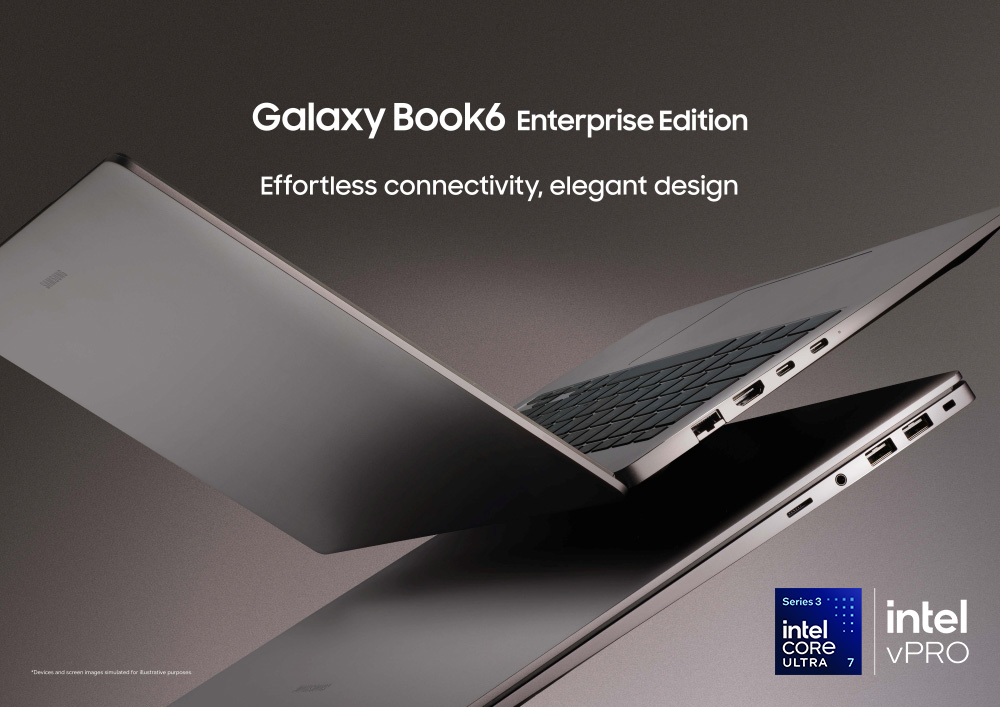
Enter the Samsung Galaxy Book6 Enterprise Edition. Built from the ground up specifically for business environments, it blends a premium, lightweight design with the heavy-duty manageability that corporate IT teams require. Powered by Series 3 Intel® Core™ Ultra processors1 with Intel vPro®2, it’s a hardware upgrade designed to make the modern workday feel a lot more effortless.
Take a closer look at how the Galaxy Book6 Enterprise Edition is elevating the daily workflow across three key areas.
Practical Productivity Powered by Galaxy AI
When deadlines are tight, any tool that saves you a few minutes is a lifesaver. The Galaxy Book6 Enterprise Edition features built-in Galaxy AI3 tools designed to take care of repetitive, time-consuming tasks so you can focus on the bigger picture.
For Busy Managers: Instead of spending an hour re-listening to a recorded strategy session, Note Assist4 can quickly transcribe the meeting and turn it into a clean, organized summary with clear action items.
For Multi-Taskers: If you’ve ever lost a crucial file in a maze of desktop folders, Intelligent Search5 lets you find documents, presentations, or reports simply by describing what you’re looking for in plain, everyday language.
For Cross-Border Teams: Reading international briefs or client feedback is seamless with AI Select6, which instantly recognizes and translates text directly from any open window on your screen.
For Content Creators: Working alongside the Galaxy S26 Ultra, you can use AI Cut Out to instantly isolate photos taken on your phone and drop them straight into a client proposal or pitch deck.
Fast Performance Meets Serious Security
A great hybrid laptop needs to satisfy two different audiences: the employees using it every day, and the IT professionals keeping the company running behind the scenes.
Under the hood, the Galaxy Book6 Enterprise Edition is packed with the latest Series 3 Intel® Core™ Ultra processors7 with Intel vPro®8 . For employees, that means speedy multitasking and plenty of battery power to get through long travel days. For IT teams, it delivers the deployment and remote management tools needed to keep a distributed fleet of laptops consistent and secure.
Because working from cafes and airport lounges means operating outside the safety of a corporate firewall, security is paramount. Galaxy Book6 Enterprise Edition helps to protect sensitive company data using Samsung Knox, a defense platform built directly into the hardware itself. Paired with quick biometric options like fingerprint recognition and facial authentication, logging in is instant for you and secure against everyone else.
A Frictionless, Ultra-Connected Ecosystem
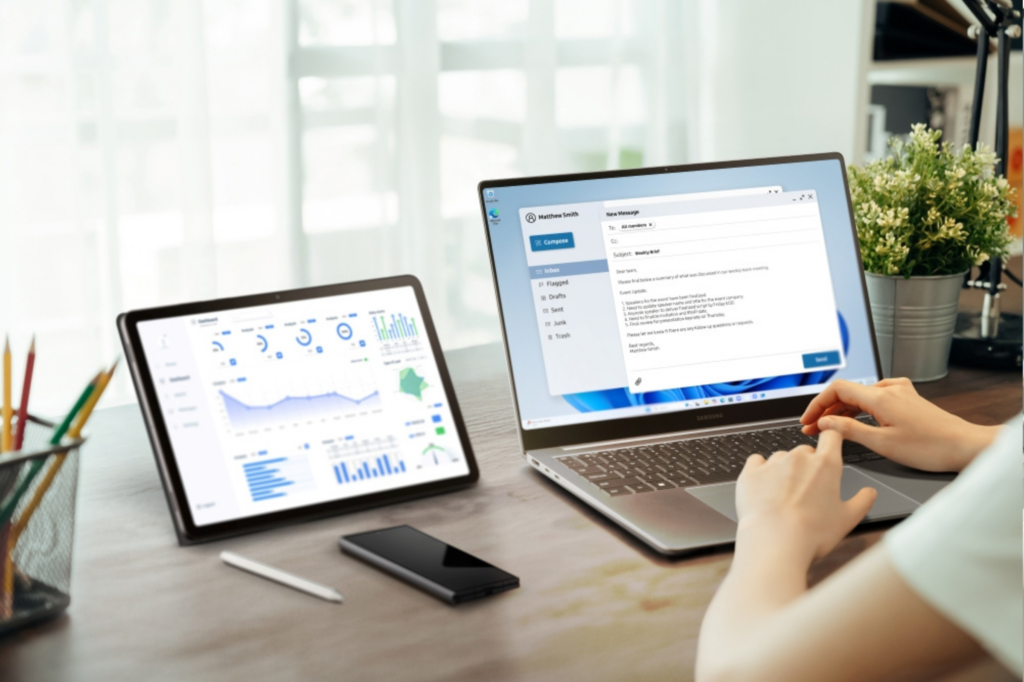
True efficiency happens when your devices stop acting like separate islands and start working together. The Galaxy Book6 Enterprise Edition is designed to act as the central hub for all your Galaxy tech.
When you pair it with a smartphone, like the Galaxy S26 Ultra, your workflow becomes entirely seamless. You can check your phone notifications, reply to urgent text messages and run mobile apps directly on your laptop screen without constantly breaking your focus. You can also send large PDF contracts, slide decks or high-res images between your phone and your laptop in just a couple of clicks via Quick Share9 or Storage Share10. And if you need more visual space while traveling, Second Screen11 lets you use a Galaxy Tab as a portable dual monitor.
With Multi Control12, you can even move your cursor and type across your laptop, phone, and tablet using a single keyboard and mouse.

The New Standard for Working on the Move
Ultimately, modern business requires tools that mirror our own agility and ambition. By combining robust processing power with intelligent AI features and a connected device ecosystem, the Galaxy Book6 Enterprise Edition proves that working on the go doesn’t mean leaving the capabilities of the main office behind.
1 Intel technologies may require enabled hardware, software or service activation. No product or component can be absolutely secure. Learn more at www.Intel.com/PerformanceIndex (Security & Manageability). Your costs and results may vary. Intel Corporation. Intel, the Intel logo, Intel vPro and other Intel marks are trademarks of Intel Corporation or its subsidiaries. Other names and brands may be claimed as the property of others. As of August 2024, based on Intel-commissioned study by Signal65 of applications and AI-enabled features using on Intel-defined test plan. See www.intel.com/PerformanceIndex for details. Results may vary.
2 The Intel vPro® platform is only available for the 14-inch model of the Galaxy Book6 Enterprise Edition. All versions of the Intel vPro® platform require an eligible Intel processor, a supported operating system, Intel LAN and/or WLAN silicon, firmware enhancements, and other hardware and software necessary to deliver the manageability use cases, security features, system performance, and stability that define the platform. See www.Intel.com/Peromance-vPro for details.
3 Galaxy AI basic features provided by Samsung are free. Future releases may include enhanced features or new services that are offered on a paid basis. Different terms may apply for AI features provided by third parties. Galaxy AI basic features are those services listed under “Advanced intelligence” in the current Samsung Services Terms and Conditions.
4 Summary for Note Assist requires a network connection and Samsung Account login. Service availability may vary by language. Summary feature for Note Assist is activated when a certain number of characters is met and is under the character limit. Audio files must be under 3 hours in duration to be processed. Accuracy of results is not guaranteed.
5 Service availability may vary by country, region or language. Certain languages may not be available.
6 Requires an internet connection. Service availability may vary by country, language or device model. Availability of supported languages may vary. Certain languages may require language pack download. AI Select download and installation may be required when launching the app for the first time.
7 Intel technologies may require enabled hardware, software or service activation. No product or component can be absolutely secure. Learn more at www.Intel.com/PerformanceIndex (Security & Manageability). Your costs and results may vary. Intel Corporation. Intel, the Intel logo, Intel vPro and other Intel marks are trademarks of Intel Corporation or its subsidiaries. Other names and brands may be claimed as the property of others. As of August 2024, based on Intel-commissioned study by Signal65 of applications and AI-enabled features using on Intel-defined test plan. See www.intel.com/PerformanceIndex for details. Results may vary.
8 The Intel vPro® platform is only available for the 14-inch model of the Galaxy Book6 Enterprise Edition. All versions of the Intel vPro® platform require an eligible Intel processor, a supported operating system, Intel LAN and/or WLAN silicon, firmware enhancements, and other hardware and software necessary to deliver the manageability use cases, security features, system performance, and stability that define the platform. See www.Intel.com/Peromance-vPro for details.
9 Available on devices with One UI 2.1 or above and Android OS 10 (Q OS) version or higher installed. Supported PCs include Galaxy Books, including Qualcomm-based PCs released in 2020 or later. Bluetooth and Wi-Fi connection are required for Quick Share. The number of devices it can share to at the same time may vary depending on the Wi-Fi chip hardware of the sharing device. Actual speed may vary depending on device, network condition and user environment. For file sharing with QR codes and contacts, a maximum of 1,000 files can be transferred at a time, a size limitation of 10 GB per file and 10 GB per day that can be transferred. The link will expire after two days. Sender’s device requires a Samsung account, and both sender and receiver devices require Internet connection. Quick Share requires download from Galaxy Book Experience app that can be downloaded from the Microsoft Store.
10 Each device must be signed in to the same Samsung account and must have both Wi-Fi and Bluetooth turned on. Requires updated Galaxy smartphones and tablets with One UI 7 or higher and kernel version 5.15 or higher and Galaxy Book2 or later(Intel) and Galaxy Book4 or later(Arm). Feature availability may vary by region and device model. Feature availability may vary by region and device model. Storage Share app requires separate download from Galaxy Book Experience app. Galaxy Book Experience app can be downloaded from the Microsoft Store.
11 For a better experience, both devices must be signed in to the same Samsung account. Available on select Samsung Galaxy Tab models only, including Galaxy Tab S11, Tab S11 Ultra, Tab S10+, Tab S10 Ultra, Tab S9, Tab S9+, Tab S9 Ultra, Tab S9 FE, Tab S9 FE+, Tab S8, Tab S8+, Tab S8 Ultra and Tab Active4 Pro with One UI 5.1.1 or later versions installed. Available on Samsung Galaxy Book series devices with Windows 11 OS or later version installed. Some additional functions are supported only on Samsung Galaxy Book series devices. Second Screen app requires separate download from Galaxy Book Experience app. Galaxy Book Experience app can be downloaded from the Microsoft Store. Some apps may not support this feature for content protection purposes.
12 Each device must be registered with a single Samsung Account and connected to the same Wi-Fi network. Multi Control requires updated Galaxy phones and tablets with One UI 5.1.1 or above and Galaxy Book series devices released in 2021 or later with Samsung Settings v1.5(Intel) or Samsung Settings v3.3(ARM) and Samsung TVs or Smart monitors released in 2024 or later. Some functions(such as Copy & Paste or Drag & Drop) may not be available when using certain device models and apps. Feature availability may vary by region. Screen image simulated for illustrative purposes. Actual UX/UI may be different. Multi Control app requires separate download from Galaxy Book Experience app. Galaxy Book Experience app can be downloaded from the Microsoft Store.